Catering automations that follow up even on your busiest day.
Automations send the routine messages for you: chasing a quote nobody answered, asking how the event went, telling the team about short-notice jobs. Messages to customers wait for your OK first.
For your customers
Chase a quote nobody has answered, and ask the customer how it went after the function. Each one is held for approval before it sends.
- Waiting messages counted on the toolbar
- Check and release in one place
- A test mode for trying rules safely
For your team
Tell the office a sales order was raised, a function date moved, a shop order arrived or an invoice was paid. Warn when a function is close, booked at short notice or cancelled close to the date.
- Team messages send straight away
- Text branch managers about new orders
- Each rule switched on or off
Everything sent, in one log
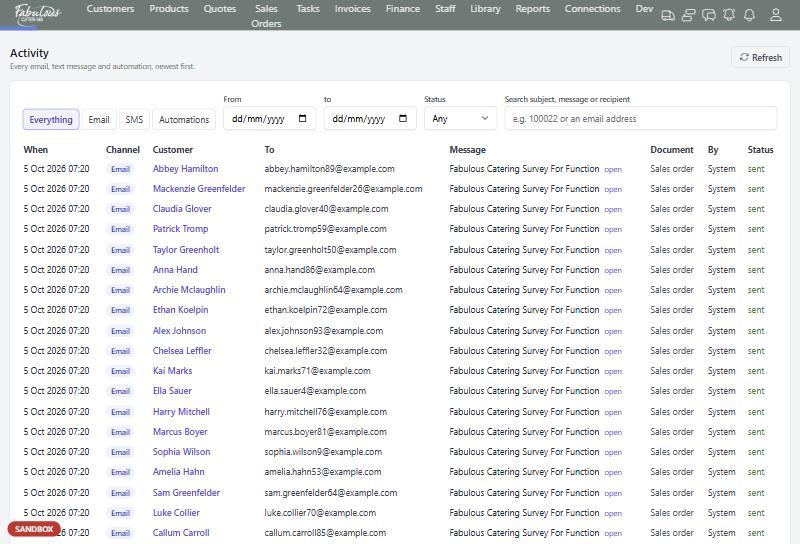
Activity lists every email, text and automation the system has sent, with its status and exactly what the customer received.
- Filter by channel, date or status
- Search by subject, message or recipient
- Spot failed messages straight away
Four steps, most of them automatic.
Switch on a rule
Pick from the customer and team automations.
Test it
Use test mode first.
Approve customer messages
They wait until someone releases them.
Check Activity
See everything that went out.
Automations & messaging: common questions
Will automations email customers without me knowing?
No. Messages to customers are held for approval until someone checks and releases them.
Can texts go to the wrong number while testing?
The SMS connection has a test mode that redirects every text to a safe number.
Works together with the rest of the day.
See automations & messaging with your own menu.
Start a 14-day free trial, or book a 30-minute demo.